problem
In many African schools the day still runs on paper. Attendance is a register and fees are paid in cash. Parents hear about their child through notices and separate chats. School leaders don't have a live picture, and parents often can't tell whether their child arrived or what is owed.
Virtuo, from De-Virtuosphere, connects it all: a card for each student, an app for staff, an app for parents and a dashboard for the school.
my role
I'm the product designer at De-Virtuosphere. I designed Virtuo from start to finish: the student card, the school dashboard, the staff app and the parent app, including the screens that handle money. I also worked with the engineers to build them.
what I did
One card that does several jobs
Each student gets a Virtuo card with a small chip inside (NFC, the same tech as tap-to-pay). One tap records attendance, shows who someone is and, where the school allows it, pays for things. One card means one habit for children, teachers and parents. The school needs no special equipment, because a phone can read the card.

A dashboard the school can read at a glance
School leaders get one place to see people, money and attendance. The overview shows students, staff, parents, income and expenses, with charts for the week. The fees page shows what is owed, what has been paid and what is late, class by class. The attendance table shows each student's recent days as green and red marks, and can be narrowed to one class.
Every school gets its own web address and sign-in, and its data is kept separate from other schools'.
Attendance in a tap
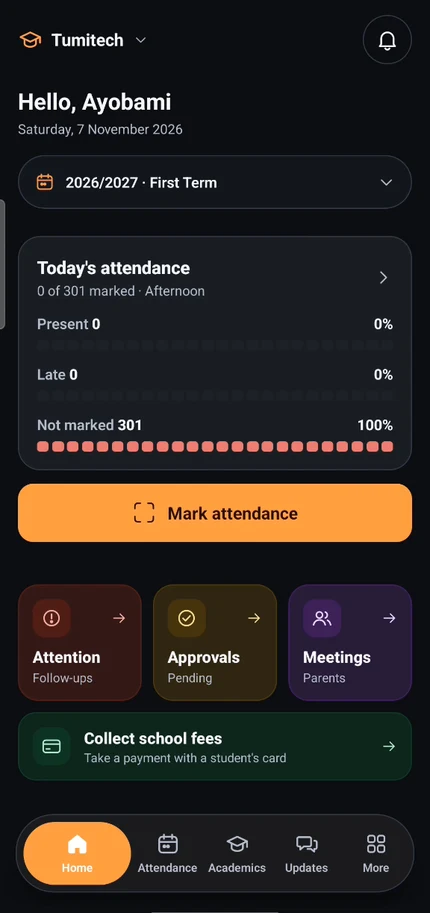
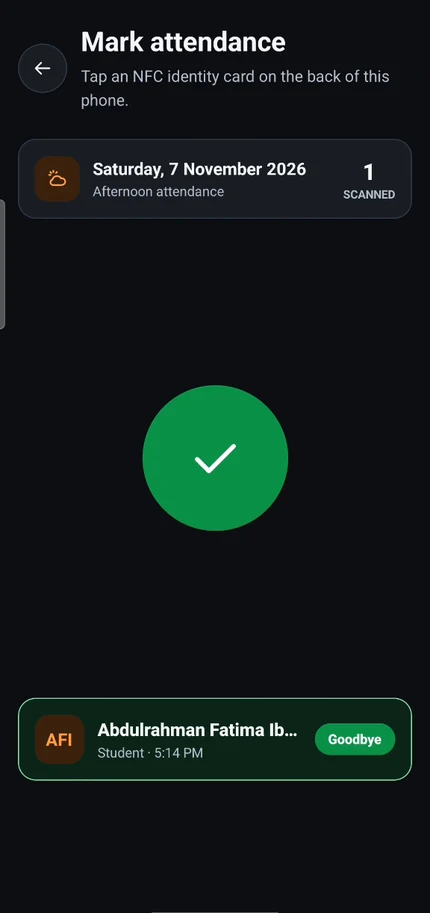
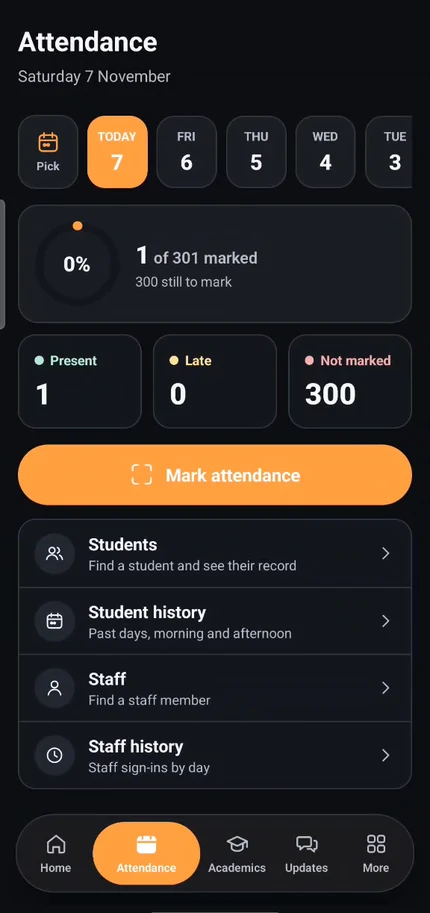
In the staff app, a teacher opens Mark attendance and holds a student's card to the back of the phone. A green tick and the student's name confirm it. Moments later the parent gets a notification, for example that their child has left for the day. The Home tab shows how the school's day is going. The Attendance tab lists who is present, late or not yet marked.
Parents who don't have to ask
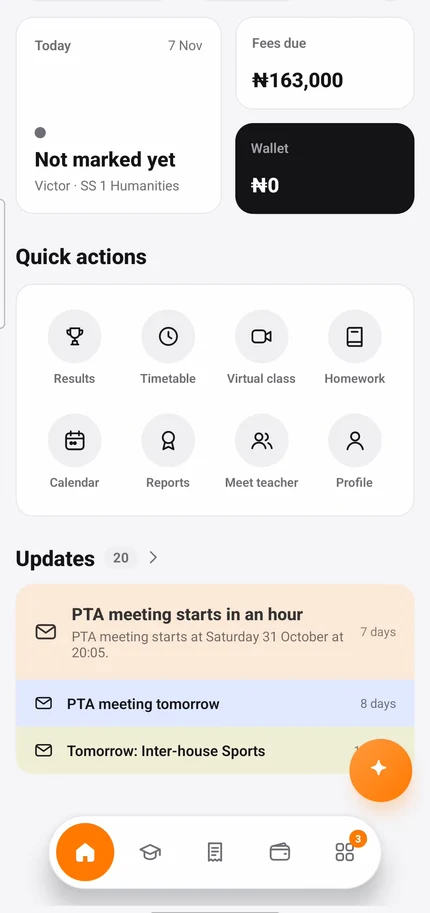
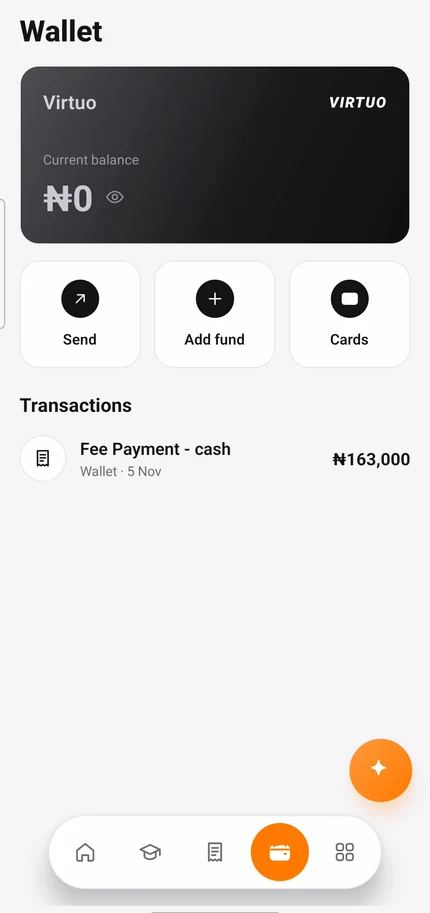
The parent app puts the child first. A parent switches between their children, then sees attendance, results, timetable, homework, fees and school news. Fees can be paid in the app, and a wallet tops up the child's card. A parent can freeze a lost card and, separately, set a spend limit. These are two controls on purpose, because stopping a stolen card and capping a daily budget are different needs.
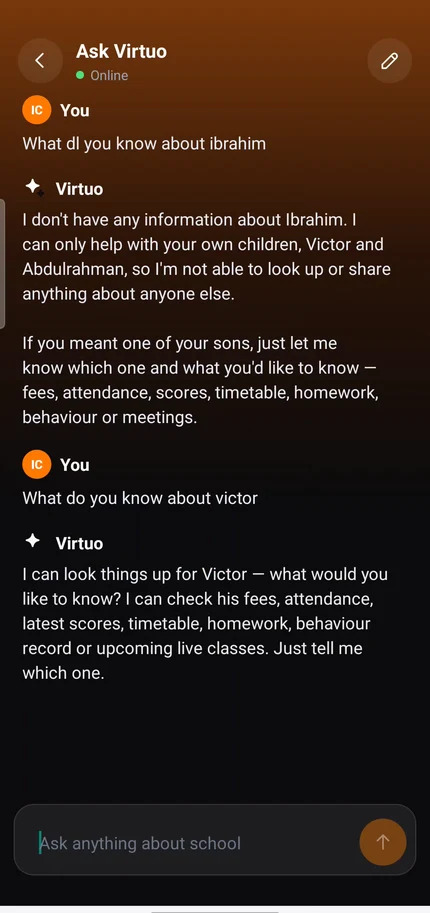
There is also an assistant, Ask Virtuo, for questions like "Has my child paid school fees?". It only answers about the parent's own children. If asked about someone else's child, it says it can't help.
under the hood
- The dashboard is a website built with Next.js. Each school has its own address.
- The staff and parent apps are built with Expo and React Native, so one codebase runs on Android and iPhone. Both share one design system. The phone reads the NFC cards directly.
- The server is built with NestJS and a PostgreSQL database. It uses Paystack so each school's fees go straight into its own account, and it keeps a record of every transaction.
- One app, not three. A separate wallet app, VirtuoPay, was folded into the parent app instead of becoming a third product. The money screens reuse parts the other screens already use.
- Each role sees its own version: parents, staff, school administrators and students.
outcome
Virtuo is live. The staff app and the parent app are on Google Play, and each school runs on its own dashboard.
lessons
Make one thing do more instead of adding another thing. The card started as an ID, then became attendance, access and payments. Each new use was easier because people already carried it.
Limit the AI to what the person is allowed to see. The assistant is safer, and more useful, when it says no clearly. A parent can trust it because it never mixes up children.