problem
Running a hospitality business means many small jobs at once. A guest checks in, the kitchen cooks an order, a bar tab is settled, a hall is booked for a wedding, and the owner wants to know what it all earned. Most businesses in our market keep these in separate tools: a notebook for bookings, a till for the restaurant, a spreadsheet for stock. Nothing adds up until the end of the month, and when the internet drops, work stops.
The tools that do exist are usually built for one kind of business. A hotel system doesn't suit a bar. A restaurant till doesn't suit an event centre.
Virtuo HUBERP is one system for all of them. The same platform runs hotels, guest houses, resorts, short-let apartments, restaurants, bars, lounges, clubs and event centres, and groups that own several of them. Staff use it on the web, or in a desktop app that keeps working when the internet doesn't.
my role
I designed and built Virtuo HUBERP at De-Virtuosphere: the staff web app, the desktop app, the website where businesses sign up, and the server behind them.
what I did
One system, many kinds of business
HUBERP is built from parts that fit together: rooms and reservations, restaurant and bar sales, kitchen orders, stock, buying, finance, staff and events. Each business gets only the parts it needs. When someone signs up they pick the kind of business they run, and the workspace is set up to match. Rooms are only asked for if the business has them.
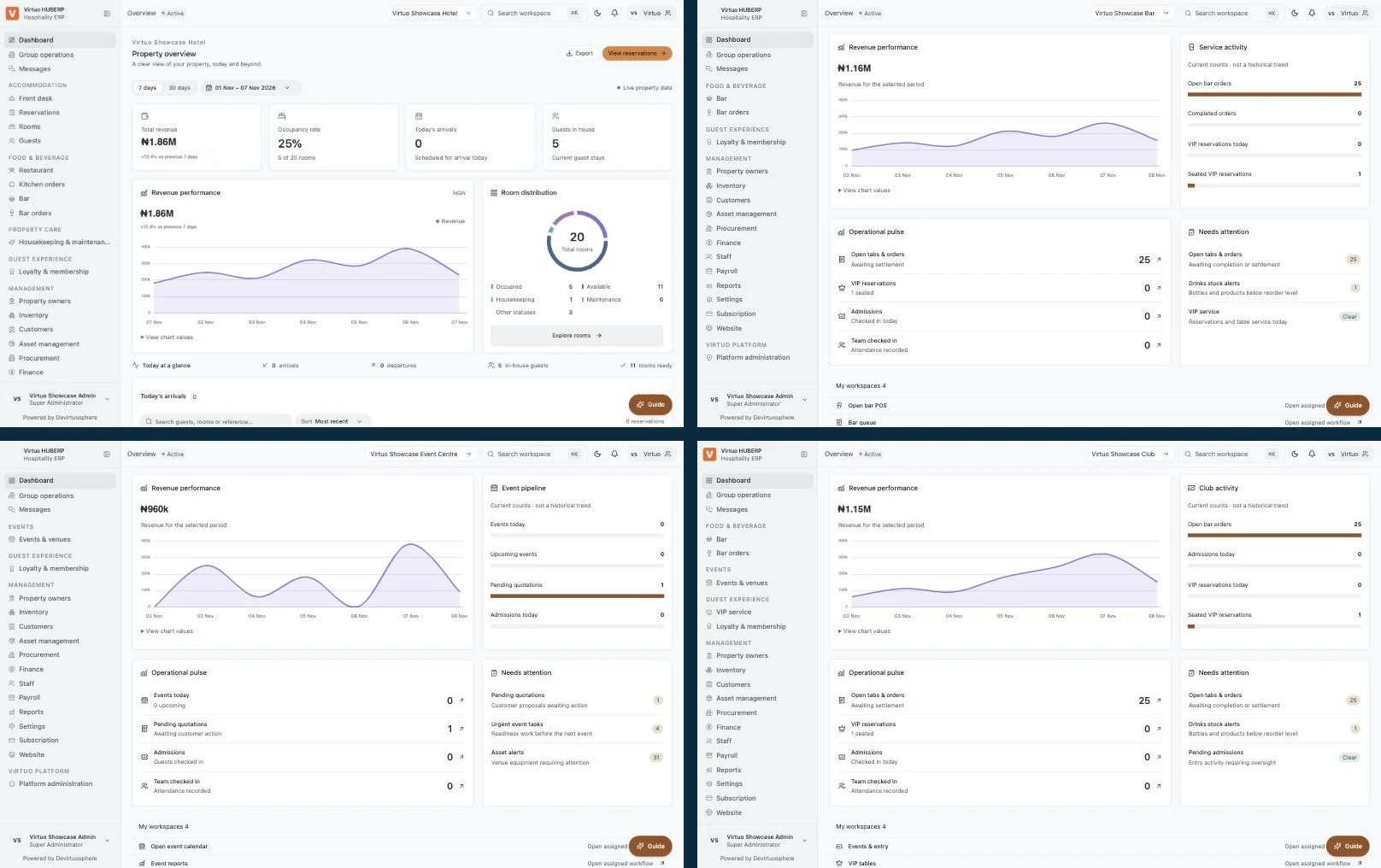
You can see it by switching between the demo businesses from the top bar. The menu, the headline numbers and the main button all change:
- A hotel gets the front desk, reservations, rooms and housekeeping, with occupancy and arrivals on the dashboard.
- A bar gets drink orders and stock. The dashboard shows open tabs, sales and stock alerts, and the main button opens the bar till.
- An event centre gets events and venues. The dashboard shows today's events, pending quotations and admissions.
- A club gets entry and VIP service on top of the bar. The dashboard shows admissions, VIP table reservations and bar sales.
Staff only see the parts their role allows.
Front desk and rooms, for stays
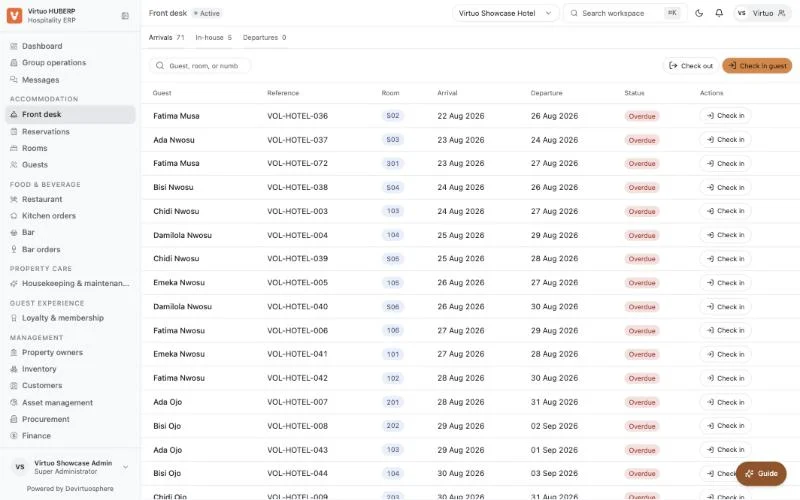
For businesses with rooms, the front desk is a list of today's arrivals and departures. Each row has the guest, the room and the dates, with Check in or Check out right beside it. A receptionist can do the common job without opening anything else.
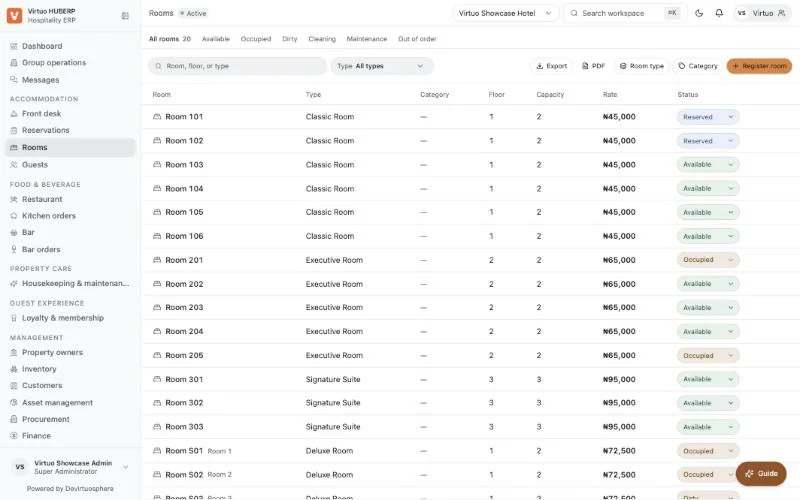
Rooms have their own page. Each room shows its type, floor, capacity, price and live status: available, reserved, occupied, dirty, cleaning, maintenance or out of order. When housekeeping changes a status, reception sees it straight away.
Restaurant and bar sales, for food and drink
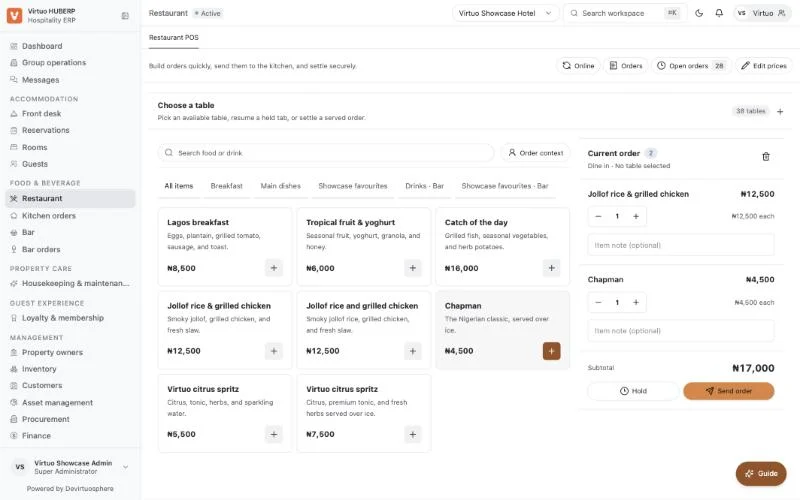
The restaurant and bar screen has three parts. On the left is the menu, with categories and search. In the middle are the dishes and drinks. On the right is the current order. Tap a dish to add it, adjust the amount, add a note for the kitchen, then Send order or Hold it.
This one screen serves restaurants, bars and lounges, each with its own outlet and stock. An order can be tied to a table, or to a guest staying in the hotel, so room service goes onto the guest's bill. Every sale also posts to the finance books, so the owner doesn't have to type it in again.
Works when the internet doesn't
A business can't stop because the connection dropped. The desktop app for Windows and Mac keeps a safe copy of the day's work on the computer. When the internet goes, staff can still take restaurant and bar orders, make new reservations, record stock movements, log attendance and track assets.
Some things deliberately wait for the internet: check-in, check-out, payments and room transfers. These touch money and room availability, so the server has to be the one to confirm them. When the connection returns, the app sends the saved work in order. If something can't go through, for example a room was booked by someone else in the meantime, staff see it and choose what to do. Nothing is dropped quietly.
Easy for a new business to start
A business signs up on the website in three steps. One sign-up creates the business, its first location, the owner's account, a seven-day free trial and the usual departments and payment methods. After email confirmation, a setup checklist on the dashboard shows what is left, based on what has really been done: rooms added, team invited.
There are three plans: Basic, Professional and Enterprise. Each plan decides which modules a business can use and how many rooms and staff it can have. These limits are checked by the server and also shown on screen, so nobody sees a button they can't use.
under the hood
- The staff app is a website built with Next.js that also works as an installable app.
- The desktop app is built with Tauri, so it runs on Windows and Mac. Its saved work is encrypted on the computer, it locks after 15 minutes of inactivity, and passwords are never stored on it.
- The server is built with NestJS and a PostgreSQL database. It is the single source of truth for every business.
- Many businesses, one system. Each business's data is kept separate. A group with several hotels or branches can be added without a redesign.
- Safe to retry. Every saved offline action has its own reference, so if it is sent twice after a bad connection, the server only applies it once.
- Plans are settings, not code. Our team can change what each plan includes, and its limits, from an admin screen.
- Shared parts. The web app, desktop app and sign-up website share one set of buttons, colours and checks, so they look and behave the same.
- A wide set of modules sits behind the screens above: reservations, restaurant and bar, kitchen, housekeeping, loyalty, inventory, buying, assets, finance, payroll, events and reports.
- Business types are data too. The sign-up website lists eleven kinds of business, each with its own pitch and pricing, from one shared list.
outcome
HUBERP is live at hub.virtuobusiness.online, with sign-up, a free trial and subscription plans for hotels, restaurants, bars, clubs, event centres and groups. Any business that signs up can download the desktop app for Windows and Mac from inside the app.
lessons
Decide what can wait for the internet. Taking an order is safe to save and send later. Confirming a check-in or taking payment is not. Drawing that line first made the offline mode simple and trustworthy.
Show people only what they can use. Tying every screen to the plan and the role removed a whole class of "why can't I click this?" moments.